
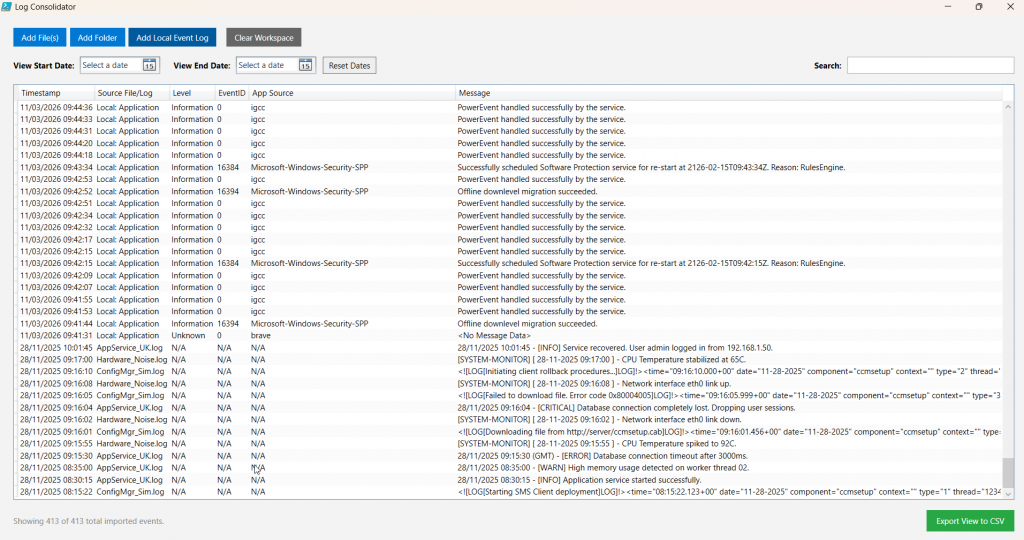
If you manage infrastructure or troubleshoot applications on your own, you know how tedious it is to track down an issue across multiple log files. Opening a dozen different text files just to piece together a timeline is a frustrating waste of time.
I needed a quieter, more efficient way to handle this, so I put together a PowerShell script called the Log File Consolidator.
What it does
It’s a straightforward script that takes the busywork out of reading logs. You point it at the log files you need to review—whether they are local or sitting on various network shares—and it merges them into a single file. I’ve tested it on generic log files, ConfigMgr log files, Windows Event Log files etc. You can search for events, export etc.
How it works
It doesn’t just blindly append the files together. The script is designed to:
- Parse timestamps: It reads the timestamp of every single entry across all the files.
- Sort chronologically: It orders everything into one continuous, accurate timeline.
- Run lightly: Built for PowerShell 5.1, it gets the job done without chewing up system resources.
Ultimately, it just means less time Alt-Tabbing between different windows trying to line up timestamps in your head, and more time actually finding the root cause so you can fix the issue and move on.
<#
.SYNOPSIS
    Log File Consolidator
#>

#Requires -Version 5.1

if ($Host.Runspace.ApartmentState -ne 'STA') {
    powershell.exe -NoProfile -ExecutionPolicy Bypass -Sta -File $PSCommandPath
    return
}

Add-Type -AssemblyName PresentationFramework, PresentationCore, WindowsBase, System.Windows.Forms

# --- 1. GLOBALS ---
$script:LogEntries    = New-Object System.Collections.Generic.List[PSCustomObject]
$script:LoadedSources = New-Object System.Collections.Generic.HashSet[string]
$script:CultureUK     = [System.Globalization.CultureInfo]::GetCultureInfo("en-GB")
$script:CultureUS     = [System.Globalization.CultureInfo]::GetCultureInfo("en-US")

# --- 2. CORE FUNCTIONS ---

function Get-LocalEventLogOptions {
    $Dialog = New-Object Windows.Window -Property @{
        Title="Import Local Event Log"; Width=380; Height=380;
        WindowStartupLocation="CenterScreen"; ResizeMode="NoResize";
        Background="#F3F3F3"; Topmost=$true
    }

    $Stack = New-Object Windows.Controls.StackPanel -Property @{Margin="15"}

    [void]$Stack.Children.Add((New-Object Windows.Controls.TextBlock -Property @{Text="Event Log Name:"; FontWeight="Bold"}))
    $Combo = New-Object Windows.Controls.ComboBox -Property @{IsEditable=$true; Margin="0,5,0,15"; Height=26; Padding="4"}
    @("System", "Application", "Security", "Setup", "Windows PowerShell", "HardwareEvents") | ForEach-Object { [void]$Combo.Items.Add($_) }
    $Combo.SelectedIndex = 0
    [void]$Stack.Children.Add($Combo)

    [void]$Stack.Children.Add((New-Object Windows.Controls.TextBlock -Property @{Text="Max Records to Fetch (0 for All):"; FontWeight="Bold"}))
    $TxtLimit = New-Object Windows.Controls.TextBox -Property @{Text="50000"; Margin="0,5,0,15"; Height=26; Padding="4"}
    [void]$Stack.Children.Add($TxtLimit)

    $ChkDate = New-Object Windows.Controls.CheckBox -Property @{Content="Restrict Import by Date Range"; Margin="0,0,0,10"; FontWeight="Bold"}
    [void]$Stack.Children.Add($ChkDate)

    $DatePanel = New-Object Windows.Controls.StackPanel -Property @{IsEnabled=$false; Margin="10,0,0,15"}
    [void]$DatePanel.Children.Add((New-Object Windows.Controls.TextBlock -Property @{Text="Start Date:"; Foreground="#555"}))
    $DateStart = New-Object Windows.Controls.DatePicker -Property @{Margin="0,2,0,8"}
    [void]$DatePanel.Children.Add($DateStart)
    [void]$DatePanel.Children.Add((New-Object Windows.Controls.TextBlock -Property @{Text="End Date:"; Foreground="#555"}))
    $DateEnd = New-Object Windows.Controls.DatePicker -Property @{Margin="0,2,0,0"}
    [void]$DatePanel.Children.Add($DateEnd)
    [void]$Stack.Children.Add($DatePanel)

    $ChkDate.Add_Click({ $DatePanel.IsEnabled = $ChkDate.IsChecked -eq $true })

    $BtnStack = New-Object Windows.Controls.StackPanel -Property @{Orientation="Horizontal"; HorizontalAlignment="Right"; Margin="0,15,0,0"}
    $BtnOk = New-Object Windows.Controls.Button -Property @{Content="Import Logs"; Width=90; Padding="6"; Background="#0078D4"; Foreground="White"; BorderThickness=0; Margin="0,0,10,0"}
    $BtnCancel = New-Object Windows.Controls.Button -Property @{Content="Cancel"; Width=80; Padding="6"; Background="#CCC"; BorderThickness=0}

    $BtnOk.Add_Click({
        $Dialog.Tag = @{
            LogName = $Combo.Text.Trim()
            UseDate = ($ChkDate.IsChecked -eq $true)
            Start   = $DateStart.SelectedDate
            End     = $DateEnd.SelectedDate
            Limit   = $TxtLimit.Text.Trim()
        }
        $Dialog.DialogResult = $true
    })
    $BtnCancel.Add_Click({ $Dialog.DialogResult = $false })

    [void]$BtnStack.Children.Add($BtnOk)
    [void]$BtnStack.Children.Add($BtnCancel)
    [void]$Stack.Children.Add($BtnStack)
    $Dialog.Content = $Stack

    if ($Dialog.ShowDialog() -eq $true) {
        return $Dialog.Tag
    }
    return $null
}

function Import-LogData {
    param (
        [string]$Path,
        [switch]$IsLocalLog,
        [hashtable]$LocalOptions = @{},
        [System.Globalization.CultureInfo]$TextCulture
    )

    if (-not $IsLocalLog -and $script:LoadedSources.Contains($Path)) {
        [System.Windows.MessageBox]::Show("File is already loaded: $Path", "Duplicate Blocked")
        return
    }

    $SourceName = if ($IsLocalLog) { "Local: $Path" } else { [System.IO.Path]::GetFileName($Path) }
    $AddedCount = 0
    $FailCount = 0

    [System.Windows.Forms.Cursor]::Current = [System.Windows.Forms.Cursors]::WaitCursor

    # --- EVENT LOGS ---
    if ($IsLocalLog -or $Path.ToLower().EndsWith(".evtx")) {
        try {
            $Limit = 50000
            if ($IsLocalLog -and $LocalOptions.Limit -match '^\d+$') { $Limit = [int]$LocalOptions.Limit }

            if ($IsLocalLog -and $LocalOptions.UseDate) {
                $Filter = @{ LogName = $Path }
                if ($LocalOptions.Start.HasValue) { $Filter.StartTime = $LocalOptions.Start.Value }
                if ($LocalOptions.End.HasValue) { $Filter.EndTime = $LocalOptions.End.Value.AddDays(1).AddTicks(-1) }

                if ($Limit -gt 0) { $Events = Get-WinEvent -FilterHashtable $Filter -MaxEvents $Limit -ErrorAction Stop }
                else { $Events = Get-WinEvent -FilterHashtable $Filter -ErrorAction Stop }
            }
            elseif ($IsLocalLog) {
                if ($Limit -gt 0) { $Events = Get-WinEvent -LogName $Path -MaxEvents $Limit -ErrorAction Stop }
                else { $Events = Get-WinEvent -LogName $Path -ErrorAction Stop }
            }
            else {
                $Events = Get-WinEvent -Path $Path -ErrorAction Stop
            }

            foreach ($Evt in $Events) {
                $SafeMessage = if ([string]::IsNullOrWhiteSpace($Evt.Message)) { "<No Message Data>" } else { $Evt.Message.Trim() }
                $script:LogEntries.Add([PSCustomObject]@{
                    Timestamp = $Evt.TimeCreated; LogSource = $SourceName;
                    Level = if ($Evt.LevelDisplayName) { $Evt.LevelDisplayName } else { "Unknown" }
                    EventID = $Evt.Id; AppSource = if ($Evt.ProviderName) { $Evt.ProviderName } else { "Unknown" }
                    Message = $SafeMessage
                })
                $AddedCount++
            }
        } catch {
            [System.Windows.Forms.Cursor]::Current = [System.Windows.Forms.Cursors]::Default
            [System.Windows.MessageBox]::Show("CRITICAL ERROR reading Event Log: $Path`n`nDetails:`n$($_.Exception.Message)", "Event Log Failure", 0, [System.Windows.MessageBoxImage]::Error)
            return
        }
    }
    # --- TEXT LOGS ---
    else {
        try {
            $Content = Get-Content -Path $Path -Encoding UTF8 -ErrorAction Stop
            foreach ($Line in $Content) {
                $CleanLine = $Line.Trim(); if ([string]::IsNullOrWhiteSpace($CleanLine)) { continue }
                $ParsedDate = $null

                if ($CleanLine -match 'time="(?<t>[^"]+)"\s+date="(?<d>[^d"]+)"') {
                    try { $ParsedDate = [datetime]::ParseExact("$($Matches.d) $($Matches.t.Split('+')[0])", "MM-dd-yyyy HH:mm:ss.fff", $script:CultureUS) } catch {}
                }
                elseif ($CleanLine -match '(?<date>\d{1,2}[/-]\d{1,2}[/-]\d{2,4}.*?\d{1,2}:\d{2}:\d{2}(\s*[AP]M)?)') {
                    $RawDate = $Matches['date'] -replace '[\(\)\[\]]','' -replace '\(GMT\)', ''
                    try { $ParsedDate = [datetime]::Parse($RawDate.Trim(), $TextCulture) } catch { }
                }

                if ($null -ne $ParsedDate) {
                    $script:LogEntries.Add([PSCustomObject]@{
                        Timestamp = $ParsedDate; LogSource = $SourceName; Level = "N/A"
                        EventID = "N/A"; AppSource = "N/A"; Message = $CleanLine
                    })
                    $AddedCount++
                } else { $FailCount++ }
            }
        } catch {
            [System.Windows.Forms.Cursor]::Current = [System.Windows.Forms.Cursors]::Default
            [System.Windows.MessageBox]::Show("Failed to read text file $Path.`n`n$($_.Exception.Message)", "File Error", 0, [System.Windows.MessageBoxImage]::Error)
            return
        }
    }

    [System.Windows.Forms.Cursor]::Current = [System.Windows.Forms.Cursors]::Default
    if (-not $IsLocalLog) { [void]$script:LoadedSources.Add($Path) }

    if ($FailCount -gt 0) {
        [System.Windows.MessageBox]::Show("Imported $AddedCount events.`nFailed to parse $FailCount text lines due to date format mismatch.", "Import Finished", 0, [System.Windows.MessageBoxImage]::Warning)
    } elseif ($AddedCount -gt 0) {
        [System.Windows.MessageBox]::Show("Success! Imported $AddedCount events from $SourceName.", "Import Finished", 0, [System.Windows.MessageBoxImage]::Information)
    }
}

# --- 3. MAIN UI CONSTRUCTION ---
$Window = New-Object Windows.Window -Property @{Title="Log Consolidator"; Width=1400; Height=800; Background="#F3F3F3"; WindowStartupLocation="CenterScreen"}
$MainGrid = New-Object Windows.Controls.Grid -Property @{Margin="20"}
[void]$MainGrid.RowDefinitions.Add((New-Object Windows.Controls.RowDefinition -Property @{Height="Auto"}))
[void]$MainGrid.RowDefinitions.Add((New-Object Windows.Controls.RowDefinition -Property @{Height="Auto"}))
[void]$MainGrid.RowDefinitions.Add((New-Object Windows.Controls.RowDefinition -Property @{Height="*"}))
[void]$MainGrid.RowDefinitions.Add((New-Object Windows.Controls.RowDefinition -Property @{Height="Auto"}))

# ROW 0: Toolbar
$ToolbarGrid = New-Object Windows.Controls.Grid -Property @{Margin="0,0,0,15"}
for($i=0; $i -lt 4; $i++) { [void]$ToolbarGrid.ColumnDefinitions.Add((New-Object Windows.Controls.ColumnDefinition -Property @{Width="Auto"})) }
[void]$ToolbarGrid.ColumnDefinitions.Add((New-Object Windows.Controls.ColumnDefinition -Property @{Width="*"}))

$BtnAddFiles = New-Object Windows.Controls.Button -Property @{Content="Add File(s)"; Padding="12,6"; Background="#0078D4"; Foreground="White"; BorderThickness=0; Margin="0,0,5,0"}
$BtnAddFolder = New-Object Windows.Controls.Button -Property @{Content="Add Folder"; Padding="12,6"; Background="#0078D4"; Foreground="White"; BorderThickness=0; Margin="0,0,5,0"}
$BtnLocalLog = New-Object Windows.Controls.Button -Property @{Content="Add Local Event Log"; Padding="12,6"; Background="#005A9E"; Foreground="White"; BorderThickness=0; Margin="0,0,15,0"}
$BtnClear = New-Object Windows.Controls.Button -Property @{Content="Clear Workspace"; Padding="12,6"; Background="#666"; Foreground="White"; BorderThickness=0}

[void]$ToolbarGrid.Children.Add($BtnAddFiles); [Windows.Controls.Grid]::SetColumn($BtnAddFiles, 0)
[void]$ToolbarGrid.Children.Add($BtnAddFolder); [Windows.Controls.Grid]::SetColumn($BtnAddFolder, 1)
[void]$ToolbarGrid.Children.Add($BtnLocalLog); [Windows.Controls.Grid]::SetColumn($BtnLocalLog, 2)
[void]$ToolbarGrid.Children.Add($BtnClear); [Windows.Controls.Grid]::SetColumn($BtnClear, 3)

[Windows.Controls.Grid]::SetRow($ToolbarGrid, 0); [void]$MainGrid.Children.Add($ToolbarGrid)

# ROW 1: Filters
$FilterGrid = New-Object Windows.Controls.Grid -Property @{Margin="0,0,0,15"}
for($i=0; $i -lt 5; $i++) { [void]$FilterGrid.ColumnDefinitions.Add((New-Object Windows.Controls.ColumnDefinition -Property @{Width="Auto"})) }
[void]$FilterGrid.ColumnDefinitions.Add((New-Object Windows.Controls.ColumnDefinition -Property @{Width="*"}))

[void]$FilterGrid.Children.Add((New-Object Windows.Controls.TextBlock -Property @{Text="View Start Date: "; FontWeight="Bold"; VerticalAlignment="Center"})); [Windows.Controls.Grid]::SetColumn($FilterGrid.Children[0], 0)
$DateStart = New-Object Windows.Controls.DatePicker -Property @{Width=120; Margin="5,0,20,0"}; [Windows.Controls.Grid]::SetColumn($DateStart, 1); [void]$FilterGrid.Children.Add($DateStart)

[void]$FilterGrid.Children.Add((New-Object Windows.Controls.TextBlock -Property @{Text="View End Date: "; FontWeight="Bold"; VerticalAlignment="Center"})); [Windows.Controls.Grid]::SetColumn($FilterGrid.Children[2], 2)
$DateEnd = New-Object Windows.Controls.DatePicker -Property @{Width=120; Margin="5,0,10,0"}; [Windows.Controls.Grid]::SetColumn($DateEnd, 3); [void]$FilterGrid.Children.Add($DateEnd)

$BtnResetDates = New-Object Windows.Controls.Button -Property @{Content="Reset Dates"; Padding="8,2"; Background="#eee"; BorderThickness=1}
[Windows.Controls.Grid]::SetColumn($BtnResetDates, 4); [void]$FilterGrid.Children.Add($BtnResetDates)

$SearchStack = New-Object Windows.Controls.StackPanel -Property @{Orientation="Horizontal"; HorizontalAlignment="Right"}
$SearchBox = New-Object Windows.Controls.TextBox -Property @{Width=250; Height=26; VerticalContentAlignment="Center"}
[void]$SearchStack.Children.Add((New-Object Windows.Controls.TextBlock -Property @{Text="Search: "; FontWeight="Bold"; VerticalAlignment="Center"; Margin="0,0,5,0"})); [void]$SearchStack.Children.Add($SearchBox)
[Windows.Controls.Grid]::SetColumn($SearchStack, 5); [void]$FilterGrid.Children.Add($SearchStack)

[Windows.Controls.Grid]::SetRow($FilterGrid, 1); [void]$MainGrid.Children.Add($FilterGrid)

# ROW 2: DataGrid
$DataGrid = New-Object Windows.Controls.DataGrid -Property @{AutoGenerateColumns=$false; IsReadOnly=$true; Background="White"; AlternatingRowBackground="#FBFBFB"; GridLinesVisibility="None"}
[void]$DataGrid.Columns.Add((New-Object Windows.Controls.DataGridTextColumn -Property @{Header="Timestamp"; Binding=(New-Object Windows.Data.Binding -Property @{Path="Timestamp"; StringFormat="dd/MM/yyyy HH:mm:ss"})}))
[void]$DataGrid.Columns.Add((New-Object Windows.Controls.DataGridTextColumn -Property @{Header="Source File/Log"; Binding=(New-Object Windows.Data.Binding -Property @{Path="LogSource"})}))
[void]$DataGrid.Columns.Add((New-Object Windows.Controls.DataGridTextColumn -Property @{Header="Level"; Binding=(New-Object Windows.Data.Binding -Property @{Path="Level"})}))
[void]$DataGrid.Columns.Add((New-Object Windows.Controls.DataGridTextColumn -Property @{Header="EventID"; Binding=(New-Object Windows.Data.Binding -Property @{Path="EventID"})}))
[void]$DataGrid.Columns.Add((New-Object Windows.Controls.DataGridTextColumn -Property @{Header="App Source"; Binding=(New-Object Windows.Data.Binding -Property @{Path="AppSource"})}))
[void]$DataGrid.Columns.Add((New-Object Windows.Controls.DataGridTextColumn -Property @{Header="Message"; Binding=(New-Object Windows.Data.Binding -Property @{Path="Message"}); Width=(New-Object Windows.Controls.DataGridLength(1, [Windows.Controls.DataGridLengthUnitType]::Star))}))
[Windows.Controls.Grid]::SetRow($DataGrid, 2); [void]$MainGrid.Children.Add($DataGrid)

# ROW 3: Footer
$FooterGrid = New-Object Windows.Controls.Grid -Property @{Margin="0,15,0,0"}
[void]$FooterGrid.ColumnDefinitions.Add((New-Object Windows.Controls.ColumnDefinition -Property @{Width="*"}))
[void]$FooterGrid.ColumnDefinitions.Add((New-Object Windows.Controls.ColumnDefinition -Property @{Width="Auto"}))

$CountLabel = New-Object Windows.Controls.TextBlock -Property @{Text="Ready."; Foreground="#888"; VerticalAlignment="Center"}
$BtnExport = New-Object Windows.Controls.Button -Property @{Content="Export View to CSV"; Padding="15,8"; Background="#28a745"; Foreground="White"; BorderThickness=0}

[void]$FooterGrid.Children.Add($CountLabel); [Windows.Controls.Grid]::SetColumn($CountLabel, 0)
[void]$FooterGrid.Children.Add($BtnExport); [Windows.Controls.Grid]::SetColumn($BtnExport, 1)
[Windows.Controls.Grid]::SetRow($FooterGrid, 3); [void]$MainGrid.Children.Add($FooterGrid)

$Window.Content = $MainGrid

# --- 4. EVENT HANDLERS ---

$Action_RefreshView = {
    $DataGrid.ItemsSource = $null
    $SearchText = $SearchBox.Text.ToLower()
    $StartBound = if ($DateStart.SelectedDate.HasValue) { $DateStart.SelectedDate.Value } else { [datetime]::MinValue }
    $EndBound   = if ($DateEnd.SelectedDate.HasValue) { $DateEnd.SelectedDate.Value.AddDays(1).AddTicks(-1) } else { [datetime]::MaxValue }

    $FilteredData = $script:LogEntries | Where-Object {
        $_.Timestamp -ge $StartBound -and $_.Timestamp -le $EndBound -and
        (
            [string]::IsNullOrWhiteSpace($SearchText) -or
            ([string]$_.Message).ToLower().Contains($SearchText) -or
            ([string]$_.LogSource).ToLower().Contains($SearchText) -or
            ([string]$_.AppSource).ToLower().Contains($SearchText) -or
            ([string]$_.EventID).ToLower().Contains($SearchText)
        )
    } | Sort-Object Timestamp -Descending

    $DataGrid.ItemsSource = @($FilteredData)
    $CountLabel.Text = "Showing $(@($FilteredData).Count) of $($script:LogEntries.Count) total imported events."
}

$BtnAddFiles.Add_Click({
    $Dialog = New-Object System.Windows.Forms.OpenFileDialog -Property @{Multiselect=$true; Filter="Log/Event Files|*.log;*.evtx|All Files|*.*"}
    if ($Dialog.ShowDialog() -eq "OK") {
        foreach ($File in $Dialog.FileNames) { Import-LogData -Path $File -TextCulture $script:CultureUK }
        &$Action_RefreshView
    }
})

$BtnAddFolder.Add_Click({
    $Dialog = New-Object System.Windows.Forms.FolderBrowserDialog
    if ($Dialog.ShowDialog() -eq "OK") {
        Get-ChildItem -Path $Dialog.SelectedPath -Include "*.log","*.evtx" -Recurse -ErrorAction SilentlyContinue |
            ForEach-Object { Import-LogData -Path $_.FullName -TextCulture $script:CultureUK }
        &$Action_RefreshView
    }
})

$BtnLocalLog.Add_Click({
    $LocalOptions = Get-LocalEventLogOptions
    if ($null -ne $LocalOptions) {
        Import-LogData -Path $LocalOptions.LogName -IsLocalLog -LocalOptions $LocalOptions
        &$Action_RefreshView
    }
})

$BtnResetDates.Add_Click({
    $DateStart.SelectedDate = $null; $DateEnd.SelectedDate = $null
    &$Action_RefreshView
})

$BtnClear.Add_Click({
    $script:LogEntries.Clear(); $script:LoadedSources.Clear()
    $SearchBox.Text = ""; $DateStart.SelectedDate = $null; $DateEnd.SelectedDate = $null
    &$Action_RefreshView
})

$SearchBox.Add_TextChanged($Action_RefreshView)
$DateStart.Add_SelectedDateChanged($Action_RefreshView)
$DateEnd.Add_SelectedDateChanged($Action_RefreshView)

$BtnExport.Add_Click({
    if ($DataGrid.ItemsSource) {
        $Dialog = New-Object System.Windows.Forms.SaveFileDialog -Property @{Filter="CSV File|*.csv"}
        if ($Dialog.ShowDialog() -eq "OK") {
            $DataGrid.ItemsSource | Select-Object @{n='Timestamp';e={$_.Timestamp.ToString("dd/MM/yyyy HH:mm:ss")}}, LogSource, Level, EventID, AppSource, Message |
                Export-Csv -Path $Dialog.FileName -NoTypeInformation -Encoding UTF8
            [System.Windows.MessageBox]::Show("Export completed successfully.", "Success")
        }
    }
})

$Window.ShowDialog() | Out-Null